


Protee VX Overhead Launch Monitor

Protee VX Overhead Launch Monitor

ProTee VX
Launch Monitor
Turn your simulator into a clean, always-ready performance studio. Dual high-speed cameras capture detailed ball and club delivery at impact—without marked balls, club stickers or a launch monitor sitting on the floor.
Serious data without slowing down your session
The VX watches the club and ball through impact, then displays feedback in less than 0.3 seconds. Its overhead design keeps the hitting floor clear and makes multi-player sessions feel natural.
Measured Impact Detail
High-speed cameras directly capture the ball-launch inputs needed to model flight, while camera imagery and A.I. identify and measure club delivery.
Righty-to-Lefty Freedom
The configurable overhead hitting area accommodates right- and left-handed golfers without relocating the launch monitor.
Near-Instant Response
Shot analysis reaches the screen in under 0.3 seconds, keeping practice, coaching and simulator play moving.
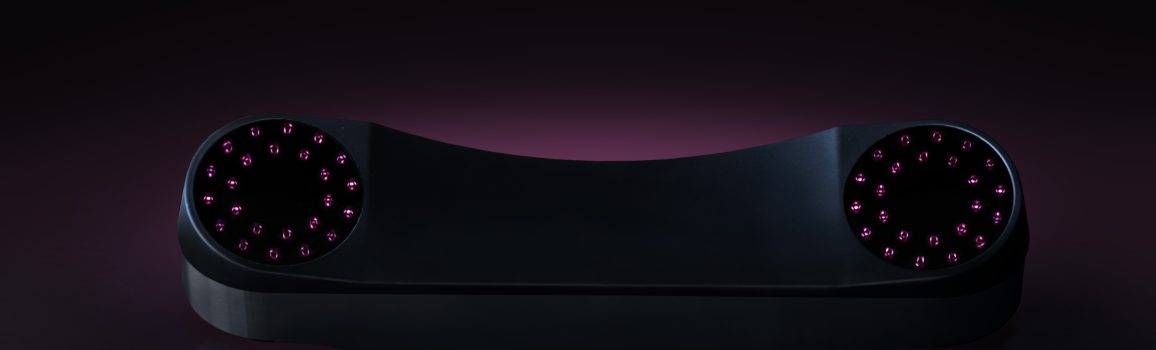
Nothing to align before every round
Once mounted and calibrated, the VX stays above the hitting area. There is no floor unit to place, no radar device behind the player and no stickers to apply before practice.
- Fixed ceiling position supports repeatable alignment
- No marked or specially patterned balls required at recommended mounting heights
- No physical club stickers—the software uses A.I.-assisted “virtual stickers”
- Suitable for home simulators, coaching studios and commercial bays
Ball, club and flight data in one system
ProTee separates directly captured impact information from the flight results produced from those measurements, giving golfers and coaches a complete view of what happened and why.
Ball Data Points
Ball speed, total spin, spin axis, back spin, side spin, launch direction and launch angle.
Club Data Points
Club speed, swing path, face angle, face-to-path, attack angle, dynamic loft, lie angle and vertical/horizontal impact point.
Flight Data Points
Flight path, apex height/time, carry, total distance, off line, air time, run and descent angle.
Measure the room before you order
The VX needs a stable overhead mounting location, the correct height and enough safe swing space for every golfer. Its camera tracking does not impose a fixed ball-to-screen distance, but your enclosure, screen and player still do.
Recommended Mount Height
Measured from the top of the ceiling mount to the top of the hitting surface. ProTee identifies 10 ft as optimal.
VX-to-Hitting Area
ProTee’s recommended positioning range between the unit and hitting area.
Maximum Hitting Zone
Approximately 65 × 55 cm and configurable for your bay.
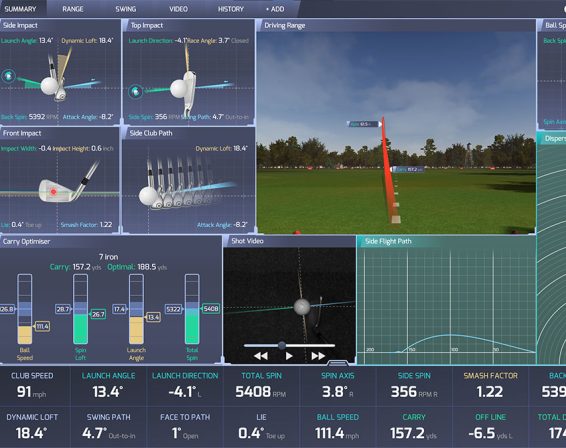
Practice with purpose
ProTee Labs organizes shot information, impact visualization and session tools into a clear analysis environment. Use the range for focused practice or display Labs on a second screen while simulator software runs on another.
- Practice range and customizable data panels
- Bag mapping and dispersion circles
- Wedge matrix, shot history and statistics
- Swing-video support with compatible cameras
- Ongoing A.I. model and software improvements
Simulator integrations: ProTee identifies compatibility with GSPro, TGC 2019 and other supported platforms. Third-party software licenses and subscriptions are sold separately unless specifically included in the Grater Golf offer.
Core hardware for mounting and calibration
Computer, projector, display, impact screen, enclosure, hitting mat, swing cameras and third-party simulator software are not included unless expressly stated in the Grater Golf offer.
ProTee VX unit and mounting plate
| Component | Dimensions | Weight | Additional Specification |
|---|---|---|---|
| VX Launch Monitor | 83 × 20 × 17 cm 32.7 × 7.9 × 6.7 in |
9.4 kg / 20.7 lb | 100 W operating; 600 W peak |
| Mounting Plate | 43.1 × 15.2 × 2.3 cm 17.0 × 6.0 × 0.9 in |
1.2 kg / 2.6 lb | Black stainless steel |
| Boxed Package | 94 × 26 × 29 cm 37.0 × 10.2 × 11.4 in |
15 kg / 33 lb | Country of origin: Netherlands |
Plan for a Windows gaming PC
| Component | Minimum for ProTee VX | Recommended With Golf Gaming Software |
|---|---|---|
| Operating System | 64-bit Windows 10 | 64-bit Windows 10 or 11 |
| Processor | Intel Core i7-8xxx @ 3.00 GHz or AMD equivalent | Intel Core i9-9xxx @ 3.00 GHz+ or AMD Ryzen 9 |
| Memory | 8 GB RAM | 16 GB RAM or more |
| Graphics | NVIDIA RTX 3060 or Radeon equivalent | NVIDIA RTX 3080+ or Radeon RX 6800 XT |
| Storage | 5 GB available | 30 GB available |
| Other | Broadband internet; USB 3.0 | DirectX 12; compatible sound; broadband internet |
Before you order
Does the ProTee VX require marked balls or club stickers?
No. At the recommended setup height, the VX works without marked balls or physical club stickers. Its A.I. uses camera imagery to identify the club and create virtual tracking references.
Can right- and left-handed golfers play together?
Yes. The overhead hitting area supports both right- and left-handed golfers without moving or reconfiguring the launch monitor between players.
How high should the ProTee VX be mounted?
ProTee recommends 9–10 feet from the top of the ceiling mount to the hitting surface, with 10 feet identified as optimal. Higher ceilings may require a drop mount, while lower installations require special planning.
How far must the ball be from the impact screen?
The VX itself does not require a specific ball-to-screen distance because it tracks the club and ball around impact. Your screen, enclosure and safe-swing layout still require adequate distance and screen-deflection clearance.
Does the ProTee VX require a subscription?
ProTee states there are no recurring software fees for the VX. Third-party simulator platforms such as GSPro or TGC 2019 have their own license and subscription terms.
Will it work with GSPro?
Yes. ProTee supports GSPro integration through ProTee Labs. GSPro must be purchased separately unless a license is specifically included in your Grater Golf package.
Can I use a Mac, tablet or phone?
No. The VX requires a compatible 64-bit Windows PC. macOS, iOS, Android, Linux and virtual machines are not supported.
Are swing cameras included?
The official ProTee packing list does not include external swing cameras. ProTee Labs can work with compatible camera equipment, which may be added separately or included only in a specially identified Grater Golf bundle.
Make sure the VX fits your room and your goals
Grater Golf can help review ceiling height, hitting position, enclosure clearance, PC requirements, software choices and the rest of your simulator build before you order.
Plan Your ProTee VX SetupLaunch monitor package only unless otherwise stated. Computer, projector, display, impact screen, enclosure, mat, external cameras and third-party simulator software may be sold separately. Specifications, software support and package contents can change; verify the current Grater Golf offer before purchase.
Shipping & Returns
Free standard shipping on most orders $100+ within the contiguous U.S. Eligible items may be returned within 30 days. Custom, modified, cut, installed, and made-to-order products may be final sale.